









 |
|

|
The RTCU development environment supports the full lifecycle of professional M2M and Industrial IoT applications. Develop, simulate, debug on real hardware, and deploy field updates using a toolchain built around RTCU M2M Studio, RTCU IEX, and the RTCU communication and deployment infrastructure.
|

|
| Development Workflow |
|---|
1. Create
Build RTCU projects in M2M Studio. |
2. Develop
Edit, organize, and maintain source code and assets. |
3. Simulate
Validate behavior with emulation and virtual I/O. |
4. Debug
Use RTCU IEX for live real-hardware analysis. |
5. Deploy
Update devices locally or remotely through RTCU infrastructure. |
 RTCU M2M Studio
The
RTCU M2M Studio provides a singular, high-performance workspace designed to facilitate the entire project lifecycle. By consolidating all essential tasks into a synchronized framework, the requirement for external programs is eliminated. This unified approach ensures that source code, execution jobs, and file assets are managed with absolute consistency throughout the development process.
The environment bridges the gap between virtual logic testing and physical hardware execution. It integrates the built-in Simulator for PC-based validation with the optional
RTCU IEX for advanced, real-time debugging on physical hardware.
- Unified Development Environment:
Centralizes project control, automated deployment, and firmware management.
- Intelligent Programming Tools:
Enhanced editor featuring real-time parameter suggestions and syntax highlighting.
- Advanced Simulation & Debugging:
Combined virtual emulation and RTCU IEX for high-precision hardware debugging.
- Flexible Deployment & Connectivity:
Supports local programming cable connections and remote field management through the
RTCU Communication Hub.
- Automatic Parameter Suggestion:
Displays parameters in real-time as functions are entered to ensure API compliance.
- Variable and Element Overview:
Provides centralized navigation and tracking for all project constants and I/O.
- Real-Hardware Debugging:
Executes applications on physical NX32L-based devices for precise timing.
- Live Manipulation via Insight!:
Enables real-time reading and writing of global variables without recompilation.
- Execution Transparency:
Visibility into the call stack and thread status with coded breakpoints.
- VPL Code Generator:
Assists in language implementation and recall of infrequently used syntax.

The RTCU M2M Studio: A unified, high-performance workspace
(click image to enlarge).
The
RTCU M2M Studio
is provided as a
FREE
download and includes an extensive technical documentation
suite. To facilitate immediate access to technical references, a
searchable
online help
system is available, providing a web-based version of the full
documentation set included with the software installation.
 RTCU IEX (Instrumented Execution)
The RTCU IEX stands as a pivotal extension to the
RTCU M2M Studio, significantly amplifying the platform's capabilities for advanced runtime analysis and in-depth debugging of applications deployed on NX32L-based devices. Architected for both rigorous development-time debugging and critical in-field analysis of elusive and intermittent issues, the
RTCU IEX represents a substantial technological
leap.
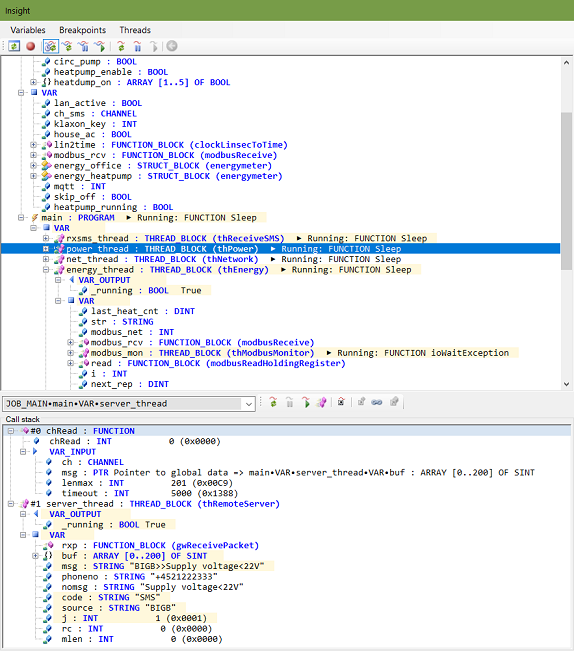
The integrated Insight! tool provides unprecedented visibility into application behavior. Seamless integration with the
RTCU M2M Studio ensures a streamlined development and debugging workflow by
offering:
• Live Data Interaction: Real-time visibility and control through live data views and edits.
• Execution Control: Granular thread and stack manipulation.
• Precision Debugging: Integrated breakpoint management for comprehensive runtime diagnostics.
The RTCU IEX enables accurate, real-world analysis on physical hardware, delivering insights that go far beyond standard emulation. It allows for the dynamic simulation and monitoring of the following system components:
| Category |
Monitored and Simulated Interfaces |
| I/O & Control |
Digital Inputs (DIN), Digital Outputs (DOUT), Switches, and LEDs. |
| Communication |
Dual CAN channels, Cellular, WLAN, and multiple Serial ports (RS232/RS485). |
| Connectivity |
Network status, Access Points, USB Host, and SMS messaging. |
| System Resources |
GNSS positioning, Power supplies, and integrated sensor data. |
Key Features of RTCU IEX:
-
Real Hardware Execution
Debug directly on physical
NX32L
devices for the most accurate results.
- Powerful "Insight!"
Tool
Get live views and edit global variables, effortlessly
pause/resume threads, inspect call stacks, and set coded
breakpoints.
- Advanced Hardware
Virtualization
Dynamically interact with virtualized components including
Digital/Analog I/O, Power, CAN, GNSS, RS232/485, Modbus, SMS,
Network states, and more.
- Comprehensive
Monitoring
Keep a close eye on detailed Cellular, WLAN, RCH, Access Point,
and USB host port information.
- Seamless RTCU M2M
Studio / RTCU IDE
Integration
Enjoy a streamlined workflow from within the
RTCU M2M Studio / RTCU IDE.
The RTCU IEX is provided as a FREE
product to facilitate the rapid development of game-changing M2M/IoT applications.
|
|
|
|